When used thoughtfully, AI can enhance user experiences through personalized interactions, increased efficiency, and innovative designs. Regardless of the AI resources or workflows you use, it's important to ensure that you're aligned with the compliance rules, ethical considerations, and best practices on this page.
PatternFly AI resources
Guidelines
- AI design principles: Core principles for designing AI-enabled experiences at Red Hat.
- Legal requirements: Legal review requirements for AI-enabled features.
- Transparency notices: Guidelines for communicating AI usage to users through visual and verbal indicators.
- Iconography: Guidelines for using AI-related icons, sparkles, and visual representations.
- Color: Color usage guidelines for AI-enabled features.
- Chatbot avatars: Guidelines for chatbot avatar design, robot icons, and launch buttons.
- Animation: Guidelines for AI-related animations and sparkle effects.
- Conversation design: Guidance for designing effective and human-centered AI conversations.
AI-assisted development
- Marketplace: Plugins for PatternFly and UXD workflows that give AI coding assistants knowledge and skills to generate more accurate, design-system-compliant code.
- PatternFly CLI: A command-line tool for scaffolding projects, performing code modifications, and running project-related tasks.
- PatternFly MCP: An MCP server that gives AI coding tools PatternFly knowledge and capabilities.
- Rapid prototyping: Guidance for generating and iterating AI features during early stages of design.
- AI-assisted code migration: Guidance for using AI to speed up and simplify codebase migrations.
- Compass layout (org demos): Full-page Compass layout examples for generative UI patterns. For React Flow integration, see the React Flow guide.
Using AI icons in React
The following AI icons are available in the @patternfly/react-icons package. For detailed usage guidelines, see Iconography.
Icon | React | Text label | Usage |
|---|---|---|---|
RhUiAiExperienceIcon | General AI identification, or when no other AI icon is appropriate. | ||
RhUiAiExperienceFillIcon | General AI identification, or when no other AI icon is appropriate. | ||
RhUiAiCreateIcon | "Create with AI" | Create something new with the help of AI. | |
RhUiAiEditIcon | "Edit with AI" | Edit something with the help of AI. Typically used for editing text. | |
RhUiAiEnhanceIcon | "Enhance with AI" | Enhance something with AI. | |
RhUiAiErrorIcon | "Error found by AI" | A problem has been identified by AI. | |
RhUiAiFilterIcon | "Filter with AI" | Filter data with the help of AI. | |
RhUiAiInfoIcon | "Information by AI" | Information partially or completely generated by AI. | |
RhUiAiSearchIcon | "Search with AI" | Search with the help of AI. | |
RhUiAiTroubleshootIcon | "Troubleshoot with AI" | Receive help from AI when troubleshooting issues. |
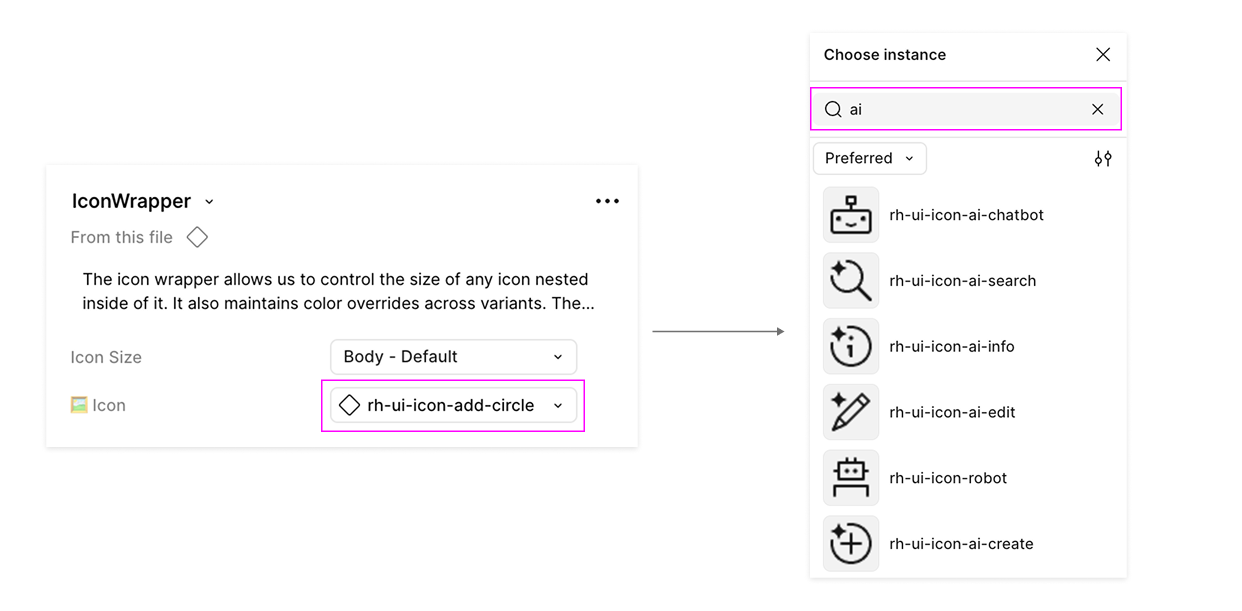
In Figma, these icons are available in the PatternFly components library via the Red Hat brand library. Using the icon wrapper component, you can swap the icons in the instance menu:
What rules and best practices do I need to follow?
All AI systems built with PatternFly must adhere to Red Hat's legal and ethical framework.
Red Hat policies
When using PatternFly to design Red Hat products, you must adhere to AI-related policies that Red Hat has previously outlined. This means you must:
- Gain approval before using AI technology for business related to Red Hat.
- Gain approval before using certain information as input for AI technology.
- Review, test, and validate generative AI model output.
- Always consider data privacy when entering company or personal information into AI resources, and ensure compliance with all company data protection policies and rules around AI usage.
PatternFly AI principles
These five core principles create our ethics-first framework, which should guide the use of AI related to PatternFly.
How do I design AI features with best practices in mind?
When designing, developing, and using AI, consider the following ethical and best-practice guidelines.
Document your value proposition
Every AI product should begin with a documented user need and problem statement. Before choosing a technology, identify the specific gap in the current experience that AI is uniquely qualified to fill.
Determine if AI adds value
Not all uses of AI are good for your UX strategy. Conduct research to identify real user needs where AI provides a clear advantage over traditional UI patterns.
Do not add AI features simply because they are new or trendy. If the value proposition isn't documented and validated by research, stick to standard UI.
When to use AI
- Improve productivity: Streamlining onboarding, data entry, or routine job tasks.
- Offer better personalization: Tailoring search results or dashboard views to a user's unique history.
- Support sustainability: Making design and development processes more repeatable.
Choosing the right AI technology
Some AI features are better suited for different types of AI, and they should align with the user's risk tolerance.
AI feature type | Usage | Risk tolerance |
|---|---|---|
Generative AI | Summarization, creative brainstorming, and conversational support. | Lower: Best when a "human-in-the-loop" can verify and edit the output. |
Predictive or structured AI | Data classification, trend forecasting, and risk scoring. | Higher: Best for tasks requiring high precision and repeatable, data-driven outcomes. |
Ethical design and compliance checklist
When working on an AI system, you should consciously check that you're in alignment with the core principles and best practices of PatternFly and Red Hat.
To help teams navigate best practices and requirements, we offer a guiding checklist that covers accountability, transparency, and fairness standards. Note that this resource is open to change and is not exhaustive. Always ensure you're following the most up-to-date industry standards and Red Hat AI requirements.
Core guidelines for AI
While the checklist handles the details, keep these three non-negotiables in mind:
- Imperceptible AI is not ethical: Users must always be able to recognize when they are interacting with an AI system.
- Communicate uncertainty: If a model has low confidence in a result, the UI must reflect that uncertainty to the user.
- Human-in-the-loop: AI should augment human expertise. Always have a human review AI-generated output for accuracy and tone before it is finalized.